PortPilot
Localhost Port Manager for Developers
Scan active ports, kill stuck processes, register your dev apps, and take control of your local development environment.
Windows 10/11 & Linux · v3.1.0 · MIT Licence
Features
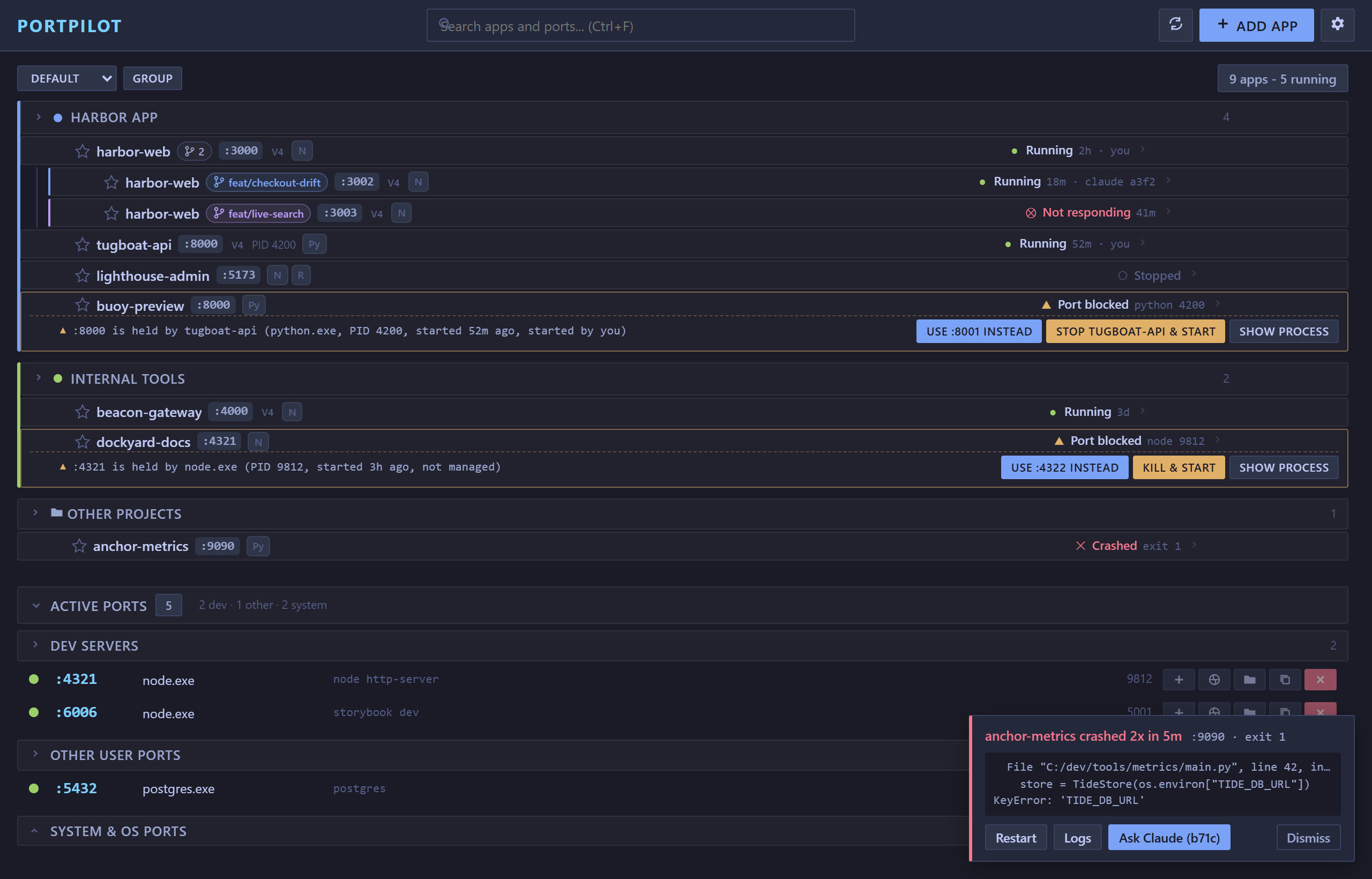
App Search & Sort
Global search filters both apps and ports simultaneously. Sort by name, running status, or port.
Single-Pane Layout
Unified view with apps and ports in one scrollable page. No more tabs.
Group Colours
Assign a colour to each group for visual organisation. Colour accents appear on group headers.
Browse & Auto-detect
One-click project setup. Scans directories for Node.js, Python, Go, .NET, Rust, Ruby, and Docker projects.
Port Conflict Warnings
Visual warnings when unknown processes block your app ports. Preview and kill with one click.
Favorites System
Star frequently-used apps for quick access with collapsible sections.
Cross-Platform
Works on Windows 10/11 and Linux (AppImage + .deb). No admin rights needed to install.
Port Scanner
Scan all TCP ports with process name, PID, command line, memory, uptime, and connection count.
One-Click Kill
Free up stuck ports instantly without Task Manager or terminal commands.
Process Control
Start/stop apps with automatic port detection, fallback ranges, and countdown feedback.
Docker Integration
Detect Docker apps, see live status badges, launch Docker Desktop with one click.
7 Themes
TokyoNight, Brutalist Dark/Light, Nord, Dracula, Solarized Light, and Glass.
VS Code Extension
Manage apps, ports, and favorites directly from the VS Code sidebar with status bar integration.
MCP v2.0
18 AI agent tools including bulk operations, group management, and real-time status checks.
Rich Tray Menu
Running apps listed in the tray with individual Stop buttons. Live app count in tooltip.
Single Instance
Only one PortPilot runs at a time. Second launch focuses the existing window.
IPv4/IPv6 Aware
Shows bind type (localhost vs all interfaces) and IP protocol version for each port.
Smart App Detection
PortPilot automatically detects app requirements and shows visual badges
Getting Started
Install
Run the installer. No admin rights needed.
Scan Ports
Click Scan Ports to discover active ports.
Register Apps
Add your dev projects with start commands and preferred ports.
Keyboard Shortcuts
VS Code Extension
Manage your dev servers without leaving the editor
Sidebar Tree View
All your apps and active ports in the VS Code sidebar with group support.
Full CRUD
Add, edit, delete apps, change ports, and toggle favorites - all from VS Code.
Status Bar
Live "PP: N running" counter in the VS Code status bar. Click to refresh.
Web Portal v3.1
Run the portal in your browser straight from VS Code, no desktop app. Opt-in, loopback-only, token-gated.
Or search PortPilot in the Extensions view (Ctrl+Shift+X)
AI Agent Integration
Control PortPilot with natural language via MCP (Model Context Protocol)
Example Commands
Security
How the web portal is protected, in plain terms, and the honest limits
PortPilot's optional web portal can run the dev commands you configure, so it treats its API as a high-value target and defends it with several independent layers. The residual risk, a leaked token or malware already running as you, is the same trust boundary as any program you launch: anything running under your user account can already read your files and run commands. PortPilot adds defences on top of that boundary; it does not widen it. The desktop app opens no network port at all; only the opt-in web portal does, and it binds to your machine alone.
Defence layers
Frequently asked
Can a website on the internet reach the portal?
No. It binds to 127.0.0.1 only, so nothing off your machine can connect. And even a malicious site open in your own browser is stopped by the Host-header allowlist (which defeats DNS-rebinding tricks) plus a per-session token it cannot read.
What stops another tab or site in my browser from driving it?
The portal serves its UI with a per-session token embedded in that page. The browser's same-origin policy means a different site cannot read the token, and CORS is locked to the portal's own origin, so cross-origin calls are rejected before they reach the API.
What does the token protect, and where is it stored?
The token is the single gate to the API, which can run your configured commands. It is a fresh 256-bit random value generated per session, written to agent.json in your per-user config directory and removed on a clean exit.
I'm on a shared or work machine. Who else can read the token?
Other user accounts cannot: agent.json lives in your per-user config directory, whose OS permissions deny other users (on Linux and macOS it is additionally written chmod 600; on Windows the per-user %APPDATA% ACL does this job). But any process running as you can read it, exactly like your own files. If you do not trust other software running under your account, leave the portal off.
Is it safe to leave running?
The listener is loopback-only and token-gated, and the web portal is opt-in (off by default). Leaving it on while you work is reasonable; if you prefer a smaller exposure window, stop it when you are done.
Why is there no HTTPS?
Loopback (127.0.0.1) is already treated as a secure context by browsers, and traffic never leaves your machine, so TLS adds nothing here. A self-signed certificate could be added if you want one.
So it can run code on my machine, by design?
Yes. PortPilot exists to start and stop your dev servers, which means running commands as you, the same power as opening a terminal. The layers above ensure that only you, holding the token, on your own machine, can trigger it. This is inherent to the tool, not a flaw, and it is the same exposure the desktop app has always had.
Full technical threat model, verified behaviour, and known limitations: Read SECURITY.md
Download PortPilot v3.1.0
Free, open source, no account required